Calarco, Luigi
- Year1910
- PlaceCayuga County, Auburn, Ward 8
- Census ScopeWard 8 ED 24 Sheet 13A #1
- Dwelling215
- Family No.231
- Address
- LocalityCity of Auburn
- Institutionblank
- Last NameCalarcoColumn 3
Names are listed in the following order: Last, First, Middle. If several members of a family have the same last name, the last name will be listed in the first record only and in following records it might be replaced by a line or a blank space. If the name is hard to read, attempt to verify the spelling with the city directory where possible. Note: If you see a last name that looks crossed out because it was written over that line, enter it as the last name. Sometimes the enumerator drew the lines first for the last name of all the people in the household, and then had to write a new last name over the line to indicate a person had a different last name. These were written over the line, not crossed out.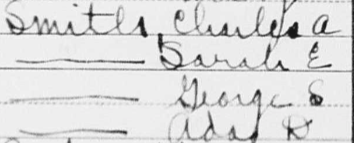
- First NameLuigiColumn 3
Names are listed in the following order: Last, First, Middle. If several members of a family have the same last name, the last name will be listed in the first record only and in following records it might be replaced by a line or a blank space. If the name is hard to read, attempt to verify the spelling with the city directory where possible. Note: If you see a last name that looks crossed out because it was written over that line, enter it as the last name. Sometimes the enumerator drew the lines first for the last name of all the people in the household, and then had to write a new last name over the line to indicate a person had a different last name. These were written over the line, not crossed out. - Middle NameblankColumn 3
Names are listed in the following order: Last, First, Middle. If several members of a family have the same last name, the last name will be listed in the first record only and in following records it might be replaced by a line or a blank space. If the name is hard to read, attempt to verify the spelling with the city directory where possible. Note: If you see a last name that looks crossed out because it was written over that line, enter it as the last name. Sometimes the enumerator drew the lines first for the last name of all the people in the household, and then had to write a new last name over the line to indicate a person had a different last name. These were written over the line, not crossed out. - TitleblankColumn 3
Enter a title in HistoryForge only if it is entered on the census sheet. - SuffixblankColumn 3
Enter a suffix in HistoryForge only if it is entered on the census sheet.
- Relation to HeadHeadColumn 4
Enter what you see on the census. If this field is blank enter the word Blank so you can save it.
Note: This field has a controlled vocabulary. If, as you enter the term from the census, the term does not appear from the list of controlled vocabulary, enter an X in the field and enter “relation to head is ____” in the notes field.
- M - MaleColumn 5
Select the option that corresponds to the answer on the census.
The scribble for “Unknown” often looks like this: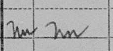
- W - WhiteColumn 6
Select the option that corresponds to the answer on the census.
The scribble for “Unknown” often looks like this: - Age31Column 7
Enter what you see on the census. If the field is blank, leave blank. If the answer is Un (Unknown) enter 999. A child that is less than two years of age will be listed by their age in months on the census i.e., 1 and 3/12. If the age is entered this way on the census, enter the years in the Age field and the months in the Age (months) field on HistoryForge.
The scribble for “Unknown” often looks like this: - Age (Months)blankColumn 7
Enter what you see on the census. If the field is blank, leave blank. If the answer is Un (Unknown) enter 999. A child that is less than two years of age will be listed by their age in months on the census i.e., 1 and 3/12. If the age is entered this way on the census, enter the years in the Age field and the months in the Age (months) field on HistoryForge.
The scribble for “Unknown” often looks like this: - M or M1 - 1st MarriageColumn 8
Select the option that corresponds to the answer on the census.
The scribble for “Unknown” often looks like this: - Years of Present Marriage7Column 9
Enter what you see on the census. If the field is blank on the census, leave it blank on HistoryForge. If the answer is Un (Unknown) enter 999.
The scribble for “Unknown” often looks like this: - No. Children BornblankColumn 10
Enter what you see on the census. If the field is blank on the census, leave it blank on HistoryForge. If the answer is Un (Unknown) enter 999.
The scribble for “Unknown” often looks like this: - No. Children AliveblankColumn 11
Enter what you see on the census. If the field is blank on the census, leave it blank on HistoryForge. If the answer is Un (Unknown) enter 999.
The scribble for “Unknown” often looks like this:
- Place of BirthItalyColumn 12
Enter what you see on the census. Note: This field has a controlled vocabulary. If, as you enter the term from the census, the term does not appear from the list of controlled vocabulary, enter an X in the field and enter “Place of Birth is ____” in the notes field.
The scribble for “Unknown” often looks like this: - Mother TongueItalianColumn 12
Generally, for foreign born only. Enter what you see on the census. If the enumerator wrote un (see below) or don’t know enter Unknown. Note: This field has a controlled vocabulary. If, as you enter the term from the census, the term does not appear from the list of controlled vocabulary, enter an X in the field and enter “Mother Tongue is ____” in the notes field.
The scribble for “Unknown” often looks like this: - Place of Birth - FatherItalyColumn 13
Enter what you see on the census. Note: This field has a controlled vocabulary. If, as you enter the term from the census, the term does not appear from the list of controlled vocabulary, enter an X in the field and enter “Place of Birth is ____” in the notes field.
The scribble for “Unknown” often looks like this: - Mother Tongue - FatherItalianColumn 13
Generally, for foreign born only. Enter what you see on the census. If the enumerator wrote un (see below) or don’t know enter Unknown. Note: This field has a controlled vocabulary. If, as you enter the term from the census, the term does not appear from the list of controlled vocabulary, enter an X in the field and enter “Mother Tongue is ____” in the notes field.
The scribble for “Unknown” often looks like this: - Place of Birth - MotherItalyColumn 14
Enter what you see on the census. Note: This field has a controlled vocabulary. If, as you enter the term from the census, the term does not appear from the list of controlled vocabulary, enter an X in the field and enter “Place of Birth is ____” in the notes field.
The scribble for “Unknown” often looks like this: - Mother Tongue - MotherItalianColumn 14
Generally, for foreign born only. Enter what you see on the census. If the enumerator wrote un (see below) or don’t know enter Unknown. Note: This field has a controlled vocabulary. If, as you enter the term from the census, the term does not appear from the list of controlled vocabulary, enter an X in the field and enter “Mother Tongue is ____” in the notes field.
The scribble for “Unknown” often looks like this: - YesThere is no corresponding field on the census. Check the box if the individual was not born in the United States and does not have the designation “Am Cit” after their place of birth.
- Year Immigrated1897Column 15
Enter what you see on the census. If the field is blank on the census, leave it blank on HistoryForge. If the answer is Un (Unknown) enter 999.
The scribble for “Unknown” often looks like this: - Na - NaturalizedColumn 16
Select the option that corresponds to the answer on the census.
The scribble for “Unknown” often looks like this: - Language SpokenEnglishColumn 17
Enter what you see on the census. If the enumerator wrote un (see below) or don’t know enter Unknown. Note: This field has a controlled vocabulary. If, as you enter the term from the census, the term does not appear from the list of controlled vocabulary, enter an X in the field and enter “Language spoken is ____” in the notes field.
The scribble for “Unknown” often looks like this:
- OccupationProprietorColumn 18
Enter what you see on the census. If the field is blank on the census, leave the default “None.” If, however, the industry is not blank or there is some other indicator of an occupation enter the word “Blank” to indicate that there was an occupation. - IndustryGrocery storeColumn 19
Enter what you see on the census. If the field is blank on the census, leave it blank on HistoryForge.
The scribble for “Unknown” often looks like this: - OA - Own AccountColumn 20
Select the option that corresponds to the answer on the census.
The scribble for “Unknown” often looks like this: - blankColumn 21
Check the box if the response is yes. - Unemployed Weeks (1909)blankColumn 22
Enter what you see on the census. If the field is blank on the census, leave it blank on HistoryForge.
The scribble for “Unknown” often looks like this: - YesColumn 23
Check the box if the response is yes. - YesColumn 24
Check the box if the response is yes. - blankColumn 25
Check the box if the response is yes.
- O - OwnedColumn 26
Select the option that corresponds to the answer on the census. Note: This information should only be entered once for the family/household.
The scribble for “Unknown” often looks like this: - M - MortgageColumn 27
Select the option that corresponds to the answer on the census. Note: This information should only be entered once for the family/household.
The scribble for “Unknown” often looks like this: - Farm No.blankColumn 29
Enter what you see on the census. If the field is blank on the census, leave it blank on HistoryForge. If the answer is Un (Unknown) enter 999.
The scribble for “Unknown” often looks like this:
- blankColumn 30
Select the option that corresponds to the answer on the census. *Note: Columns 30-32 will sometime include a series of annotations rather than responses to the questions themselves (see image below). These annotations were the key-punch symbols used for post-enumeration processing of the census. If this is the case, do not check the boxes and do not enter this information into the Notes field.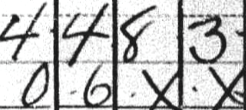
The scribble for “Unknown” often looks like this: - blankColumn 31
Select the option that corresponds to the answer on the census. *Note: Columns 30-32 will sometime include a series of annotations rather than responses to the questions themselves (see image below). These annotations were the key-punch symbols used for post-enumeration processing of the census. If this is the case, do not check the boxes and do not enter this information into the Notes field. - blankSelect the option that corresponds to the answer on the census. *Note: Columns 30-32 will sometime include a series of annotations rather than responses to the questions themselves (see image below). These annotations were the key-punch symbols used for post-enumeration processing of the census. If this is the case, do not check the boxes and do not enter this information into the Notes field.
- Notes
Creating a meal plan for an 83-year-old man with vasculitis and kidney failure requires careful consideration of the dietary restrictions necessary for managing both conditions. These two health concerns impact the body’s ability to process proteins, electrolytes, and fluids, so a tailored meal plan should be low in sodium, potassium, and phosphorus, while also being mindful of protein intake. Additionally, it's important to avoid foods that may exacerbate inflammation in the case of vasculitis.
General Guidelines:
Low Sodium: Avoid processed foods, canned soups, salty snacks, and restaurant meals. Limit the use of salt in cooking.
Controlled Protein: Protein should be limited to prevent kidney strain, but not eliminated entirely. High-quality protein sources are preferred (e.g., chicken, fish, eggs).
Low Potassium: Monitor potassium-rich foods (like bananas, potatoes, and tomatoes), as high levels can be dangerous in kidney disease.
Low Phosphorus: Avoid phosphorus-rich foods like nuts, seeds, dairy products, and cola drinks.
Hydration: Kidney disease often requires fluid restriction, so the amount of liquids consumed may need to be monitored.
Anti-inflammatory foods: Include foods that may help reduce inflammation, such as omega-3 fatty acids (found in fish), berries, and leafy greens.
Here is a 7-day meal plan that balances these needs:Day 1:
Breakfast:Scrambled egg with spinach (use a small amount of olive oil for cooking)
Toast with a thin spread of unsalted butter
Fresh strawberries (low potassium, high in antioxidants)
Lunch:Grilled chicken breast
Steamed zucchini and carrots
Small portion of white rice (low in potassium and phosphorus)
Snack:Apple slices with a small amount of peanut butter (watch phosphorus content, or use almond butter)
Dinner:Baked salmon (rich in omega-3s)
Roasted sweet potatoes (small portion, because they are moderate in potassium)
Steamed green beans
Day 2:
Breakfast:Oatmeal (prepared with water) topped with blueberries and a small amount of cinnamon
A boiled egg
Lunch:Turkey breast slices (unsalted, lean)
Mixed greens salad (lettuce, cucumbers, and a small portion of avocado) with olive oil and vinegar dressing
A slice of white bread (low potassium)
Snack:Carrot sticks with hummus (small amount to control phosphorus)
Dinner:Grilled tilapia or cod
Steamed cauliflower and asparagus
Small baked potato (watch portion size for potassium)
Day 3:
Breakfast:Greek yogurt (plain, low phosphorus variety) with a few raspberries
Whole wheat toast with a little unsalted butter
Lunch:Roasted chicken breast with a drizzle of olive oil
Steamed broccoli and carrots
A small serving of quinoa (low in phosphorus)
Snack:A pear (low potassium)
Dinner:Grilled turkey burger (without the bun)
Roasted brussels sprouts
Brown rice
Day 4:
Breakfast:Scrambled eggs with sautéed mushrooms (use olive oil)
A slice of white toast
Lunch:Tuna salad (canned tuna in water, low-sodium, mixed with a small amount of mayo and diced celery)
Sliced cucumber and bell pepper with a drizzle of olive oil
A small portion of unsweetened applesauce
Snack:A small apple
Dinner:Baked cod with lemon
Steamed green beans
A small baked sweet potato
Day 5:
Breakfast:Smoothie made with unsweetened almond milk, a few strawberries, spinach, and a small scoop of protein powder (check for low potassium, phosphorus content)
Hard-boiled egg
Lunch:Grilled chicken breast
Sautéed spinach (with a little olive oil)
Small serving of white rice
Snack:A handful of unsalted almonds (small portion due to phosphorus content)
Dinner:Beef (lean cut, like sirloin) stew with carrots and peas
Steamed cauliflower
Day 6:
Breakfast:Cottage cheese (low sodium, phosphorus-controlled version)
Fresh raspberries
A slice of whole-grain toast
Lunch:Grilled shrimp with olive oil and garlic
Roasted butternut squash (small portion)
A small serving of quinoa
Snack:Carrot and celery sticks with a small amount of hummus
Dinner:Grilled chicken thighs (skinless)
Steamed zucchini
Mashed potatoes (made with olive oil and low sodium)
Day 7:
Breakfast:Whole wheat pancakes (low sugar) with a small drizzle of maple syrup
Scrambled eggs with diced tomatoes and spinach
Lunch:Baked chicken with roasted bell peppers and onions
Mixed greens salad (lettuce, cucumbers, a few olives) with olive oil and balsamic vinegar
Small serving of white rice
Snack:A small apple or pear
Dinner:Grilled tilapia
Sautéed kale (with olive oil)
Small portion of quinoa
Tips for Adjusting the Meal Plan:
Protein: Adjust the amount of protein based on individual needs and the advice of a healthcare provider. If the kidney failure is in a more advanced stage, further protein reduction may be necessary.
Fluid Intake: Be cautious of liquid intake if fluid restrictions are prescribed. Use foods like popsicles or ice chips for hydration if fluids are limited.
Monitoring Potassium and Phosphorus: Work with a healthcare professional to monitor potassium and phosphorus levels regularly and adjust foods accordingly.
This meal plan emphasizes a balance between low potassium, low sodium, and adequate nutrients while addressing both vasculitis and kidney failure. Always consult with a healthcare provider or dietitian for personalized modifications and adjustments based on specific health needs.Name verified in 1910 Auburn Directory.
If you find additional or conflicting information about the person such as a different name spelling or address, include the information as written by the enumerator in the relevant field(s) and enter the alternative information here and its source. If you checked the city directory, include the year, i.e., The address in the 1919 City Directory is _______.
*Important - the information in the notes field will become public.
| Name | Sex | Age | Relation | Occupation |
|---|---|---|---|---|
| Calarco, Rachel | Female | 26 | Wife | None |
| Calarco, Mary | Female | 6 | Daughter | None |
| Calarco, Antoinette | Female | 4 | Daughter | None |
| Calarco, Carmella | Female | 2 | Daughter | None |
| Calarco, Helen | Female | 3mo | Daughter | None |
| Calarco, Antony | Male | 23 | Boarder | Heel trimmer |
| Calarco, Rosie | Male | 18 | Boarder | Heel sewer |